YouTube channel: create one or buy one?
I recommend reading the whole guide. The details below about ownership transfers, phone numbers and account recovery can help you avoid losing access.
Contents
Which features you need
The second level is intermediate features. Phone verification lets you upload custom thumbnails and videos longer than 15 minutes.
The third level is advanced features. These include pinned comments, clickable external links in long-form video descriptions, and title and thumbnail testing on eligible videos.
You can check your access here:
YouTube Studio → Settings → Channel → Feature eligibility.
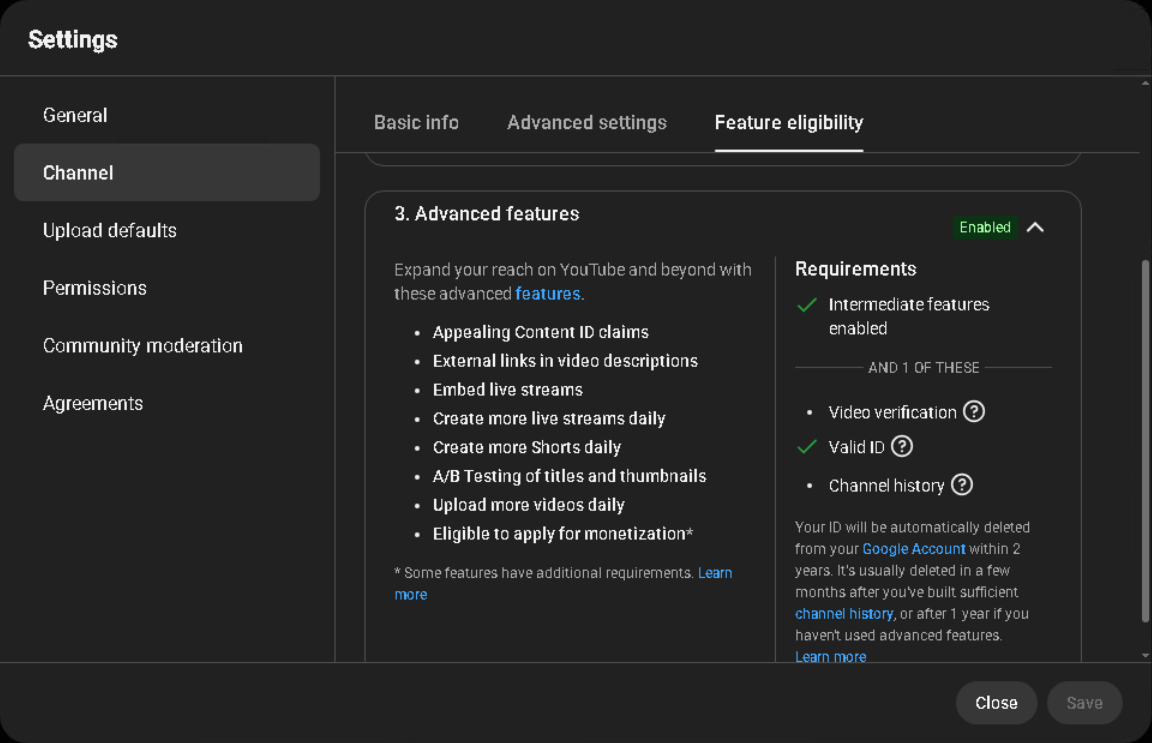 Enlarge screenshot ↗
How I create the main channel
First, I choose a Google account. I use an existing account that I fully control or create a new one.
The most recent Google account registration method I used came from this video. Start at 3:53. The video is in Russian.
It worked for me. Google may ask for additional verification when you register a new account.
Next, I verify a phone number to unlock intermediate features. This is done under Feature eligibility.
If you do not have a suitable number, one option to try is the SMS service OnlineSIM.
YouTube may reject a particular virtual number. A phone number can be used to verify no more than two channels per year.
Do not use a disposable number as your Google account recovery number. Recovery requires a number you can keep access to.
Then I run the channel and build its history. This is what I mean by “warming up”: publishing videos, using the account and following the platform’s rules. There is no fixed period after which advanced features are guaranteed.
You can unlock the third level through sufficient channel history or ID or video verification, if YouTube offers those options.
What I check before buying
I most often buy through FunPay. Another marketplace is AccsMarket.
Before paying, I check three things:
- Channel history: when it was created, what was published and whether there were violations. I consider its age, but the registration date alone does not guarantee views or monetisation.
- Advanced features: I ask to see the current status in YouTube Studio and how access was obtained — through history, ID or video verification.
- Ownership transfer: I check how the legitimate owner will transfer full control and what access they will retain. Brand Account channels have an ownership transfer process.
Advanced feature access can be lost, including because of policy violations. Recovery may be possible; YouTube lists the available options in its notification. I would not pay extra for a seller’s promise of “advanced features forever”.
How to keep access secure
After creating or buying a channel, I:
- add a recovery email that I control;
- check the recovery phone number;
- enable two-step verification;
- store the password and backup codes securely;
- review devices, owners and managers.
Do this straight away. Later, you will want to work on videos — not hunt for a SIM card last seen during a house move.
What about monetisation?
I have enabled it on both channels I created and channels I bought. In either case, the channel must meet the YouTube Partner Program requirements and pass YouTube’s review.
Regional restrictions also matter. At the time this guide was prepared, new Partner Program sign-ups were unavailable to creators in Russia, and channels linked to Russia-based AdSense for YouTube accounts could not monetise. Creating a new email account does not remove those restrictions.
I will cover monetisation setup, AdSense and payments in a separate guide.